
When you receive an Asset QC Fail, your task will be reopened with the "Flagging QC Failed" reason. Asset QCs are often performed by third parties and often consist of a 5-point check where the file is checked at the beginning, 25% in, 50% in, 75% in and at the very end (usually just for 1 or 2 minutes at each point). If the QCcer finds errors at those points, the file may receive a Fail notice, and it will be reopened for the translator to make any necessary corrections.
In order to find the errors, you need to go to the "Flagging QC Errors" in Reference Materials to check the flagged issues.
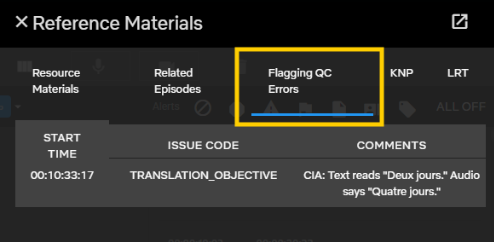
- If you agree with the flagged issues, apply the necessary changes to your file and submit as per the deadline.
- If you disagree with all flags, email us to explain your point, and do not submit until you get our answer. In case no answer arrives in a timely manner, please check with us.
- If you disagree with only some flags, but agree with others, implement the fixes you agree with, disregard the others, and submit as per the deadline.
We also always ask linguists to fill out the Asset QC fail report whenever you receive such a task. Your input is important because, in some cases, the fail may be invalid. Each quarter, we analyze the metrics data with Netflix, and any invalid fails must be rectified. Therefore, completing the reports is crucial. Please be informed that you must always submit the form after receiving the Asset QC fail.