
Originator
To access Originator, please log in using the ID we've created for you. The standard format of the ID is [email protected], where "xxxxx" represents your first name and "yyyyy" your last name. Any emails and notifications sent to this address will be redirected to your personal email.
Shortly after your onboarding confirmation, you'll receive a request to set a password for Originator. Follow the link provided in the email to create a new password for login.
In case you haven’t received the notification yet, please try the following steps:
Follow this link: Reset password
Enter the email address we’ve created for you: [email protected].
You will receive a link in your personal account to set a new password.
Once you set the password, clean cache and cookies, and try logging in:
Link: Netflix Authentication
Originator MFA Setup
From June 23, 7 PM PST 2025 onwards, upon navigating to a Netflix application, you will be presented with a “Secure Your Account” page with two or three options to set up Multi-Factor Authentication.
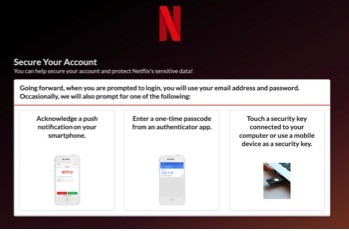
Select “Enter a one-time passcode from an authenticator app.” This option will be compatible with users who are currently using an authenticator app such as: Microsoft, Google, Okta Verify, Duo, or Authy.
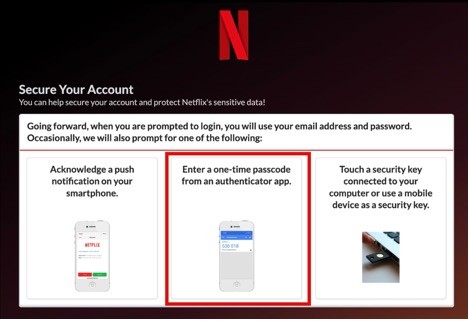
If you have multiple different user accounts to log in to Netflix tools (e.g. a different username / email address for separate studios), you will need to register a device for MFA the first time you log into each of your accounts. If you have alias email addresses for separate studios tied to a single user account / email address, you will only have to register for MFA once. In Keywords DTT’s case, the second case should apply to all linguists as we have assigned alias email addresses for all the linguists in our pool.
Once the MFA is set up, moving forward, you will receive this screenshot to authenticate when you log in.
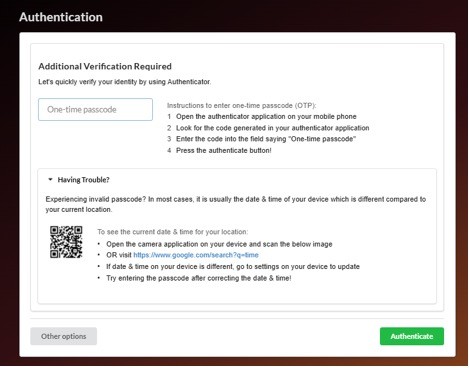
For MFA registration issues or questions encountered, please email the Netflix Support Team: [email protected].
Business Production System (BPS)
For the Business Production System (BPS), our proprietary portal for invoicing, you will receive an email from our staff with the subject "Keywords Studios Group: BPS access data and link to guidelines".
This email will contain the credentials for accessing the portal and instructions on how to navigate through it. Please be aware that the instructions are tailored to different profiles within our group, so not all documents may apply to your specific collaboration. Please save the email and download the relevant documentation as per the provided instructions.
Link: BPS