
To enhance transparency regarding our evaluation and quality assurance workflows, a Quality Control report will be issued for your review on a weekly basis.
Kindly be aware of the following points:
These reports are provided for your information. You are not required to reply or offer feedback unless we contact you separately.
If you do not receive the report for a given week, it means none of your files went through Asset QC or Loc QC during that period, or you did not deliver any task during that period.
This report is an Excel file with four dedicated tabs summarizing AssetQC and LocQC performances.
Report Tabs Overview

AssetQC Results: Provides an overall summary of files that went through Asset QC, indicating whether they were Pass or Fail.
AssetQC Errors: Lists all specific errors found during Asset QC, regardless of the final result (Pass, Pass-with-issues, or Fail).
LocQC Results: Contains overall performance metrics for your QC'd files, including the total number of all errors, objective errors, subjective errors, and their averages.
LocQC Errors: Lists all specific errors identified during Localization QC.
- Episodic Titles: Lists all delivered Episodic Titles tasks.
- LocQC Summary: Lists all delivered QC tasks (for QCers only, not authors).
- Origination Summary: Lists all delivered authoring tasks.
Essential Columns
Please focus your review on the following essential columns:
Identification & Metrics:
SASS email, title_id, package_id, title_desc, asset_type, source and target language, runtime_minutes, reason_code, assetqc_result.
Error Details:
issue_code, issue_count, error_code, objective, issues.
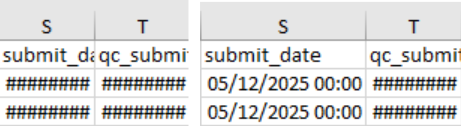
Note on Dates: The columns submit_date and qc_submit_date may sometimes display as "######". If this occurs, simply make the column wider to reveal the full date.
Crucial Thresholds & Definitions
Objective Errors Per Event (EPE): In the "LocQC Results" tab, you must closely monitor the objective_errors_per_event column (AE). If your score exceeds 0.05, you may be contacted by our team for an additional review, as the KPI is above the EPE threshold. A detailed report will be shared to your individual tracker by the LL in case there is any concern.
Asset QC Fail: If an AssetQC failure is included in your report, you must complete the separate report available at this link: Asset QC Fail Report.
Net Neutral: This column indicates the task type:
True: The QC was performed on a longform task.
False: The QC was performed on supplemental, custom, fixes, FQF tasks.
Reviewing this document regularly is key to maintaining our quality standards. Please contact [email protected] in case you have any questions.