
The results of Pre-delivery checks, Post-delivery checks and Loc QC Report Migration are shared via individual quality trackers. Each linguist has their one tracker shared with them via Keywords’ Google account.
Guidelines
Whenever there’s any feedback, you’ll be notified by LL.
Please review the reported issues and indicate your agreement or disagreement in the "Agree?" (AA) column of the tracker.
Should you disagree, kindly provide your comments in the "Arbitration Comment" (AB) column.
All reported issues require acknowledgment.
In case of purely preferential issues that do not improve the quality, please choose Disagree and leave a comment "Preferential".
Avoid extensive arbitration of non-preferential Subjective/FYI issues if they do improve the quality; focus on learning from these corrections.
Individual Quality Tracker Structure
An individual linguist tab consists of a number of columns that organize the data about the linguist’s performance, in particular listing all the issues found in the course of the quality evaluations. It could be divided into two parts: project-level and issue-level.
Project-Level Columns
Columns from A to J are project-level and are identical for each particular project being evaluated:

Here’s the breakdown of the project-level columns of the individual linguist tab:
1. Project # column value should be the number of a linguist’s project getting evaluated starting from 1 as the first project being checked.
2. Date column contains a value for a date when the evaluation was assigned or when Loc QC was submitted.
3. Project Source column contains a value from the dropdown menu that indicates the source/media of how/why the project got into evaluation:
a) Pre-Delivery: the project was assigned to evaluation before the project delivery.
b) Post-Delivery: the project was assigned to evaluation after the project was delivered.
c) Loc QC: the project was assigned to evaluation as a result of a Loc QC escalation.
d) Asset QC: the project was assigned to evaluation as a result of an Asset QC escalation.
4. Linguist сolumn value should contain a linguist’s name.
5. Role column contains a value from the dropdown menu that indicates the linguist’s role:
a) Origination: a linguist had a standard subtitle author role.
b) QC: a linguist was a standard QCer of a project.
c) SDH: a linguist had an SDH subtitle author role.
d) SDH QC: a linguist was an SDH QCer of a project.
e) Template: a linguist had a Template author role.
f) Template QC: a linguist was a Template QCer of a project.
6. Type column contains a value from the dropdown menu that indicates the type of a project:
a) Longfrom: a title is a longfrom.
b) Supplemental: a project is a supplemental.
7. Title column contains a title/episode name.
8. MID column contains a title Movie ID.
9. PID column contains a title Package ID.
10. Link column contains an Originator link leading to the Originator page of a specific task.
Issue-Level Columns
Columns from K to Y are issue-level. If data for project-level columns (A-J) are identical for each particular project being evaluated, issue-level data is different for every issue identified during the evaluation:
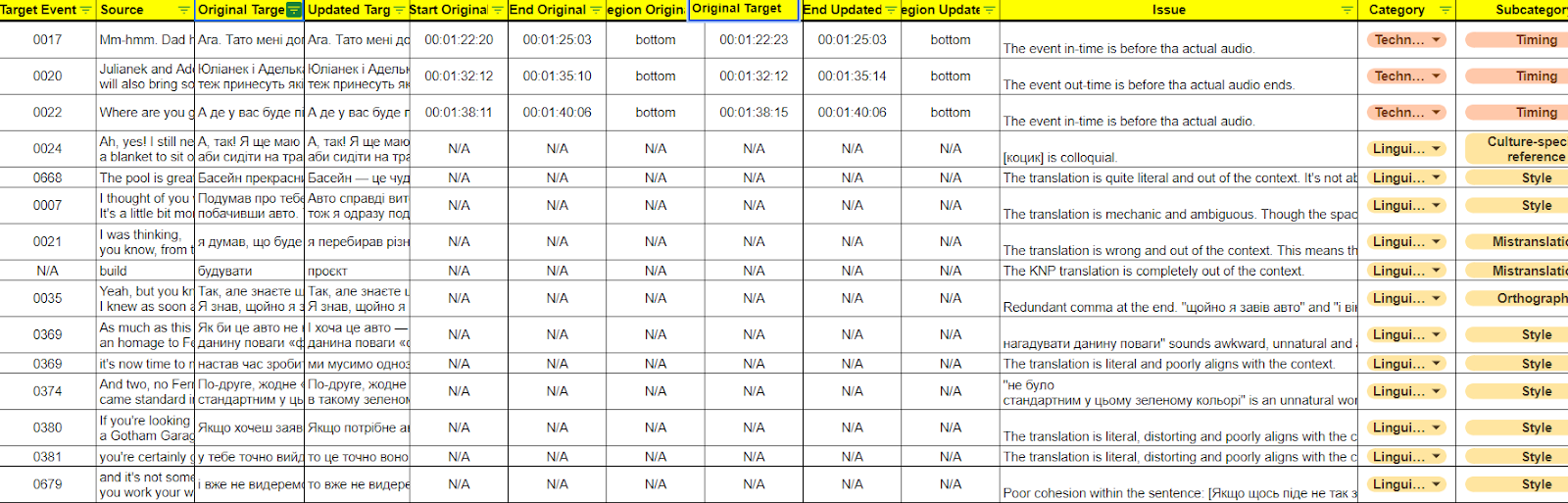
Here’s the breakdown of the issue-level columns of the individual linguist tab:
Target Event column contains a number of a specific target language event where the issue was identified.
Source column contains the event text in the source language.
Original Target column contains the event original text in the target language with an issue.
Updated Target column contains the updated event text in the target language with an issue fixed.
Issue column contains the description of an issue identified.
Category column contains a value from the dropdown menu that indicates the error category as per Netflix LQA Taxonomy.
Subcategory column contains a value from the dropdown menu that indicates the error subcategory as per Netflix LQA Taxonomy.
Severity column contains a value from the dropdown menu that indicates the error severity as per Netflix LQA Taxonomy.
QC Error Category contains a category as per Netflix QC Taxonomy.
Action Item column should contain an action plan for a linguist that should help remediate the knowledge gap that led to the issue. Sometimes, there are no specific action plans and the value may be ‘N/A’ in that case.